StoreSync
Import · Export · Automate

Manage Shopify metafields at spreadsheet speed.

StoreSync edits products, collections and pages in one grid — and imports or exports metafields by CSV or Google Sheets. Stop clicking through Shopify Admin one product at a time.
Built for Shopify Unlimited imports & exports CSV, XLSX & Google Sheets
storesync / products
StoreSync Bulk Editor — products grid StoreSync Bulk Editor — collections StoreSync History — import & export jobs StoreSync File Import — upload step
Synced just now37 / 37 products
Import 97%
36 / 37 rows imported
What's inside

Everything you need to run metafields at scale

Four tools that replace hours of manual work in Shopify Admin — all inside one app.

Bulk Editor

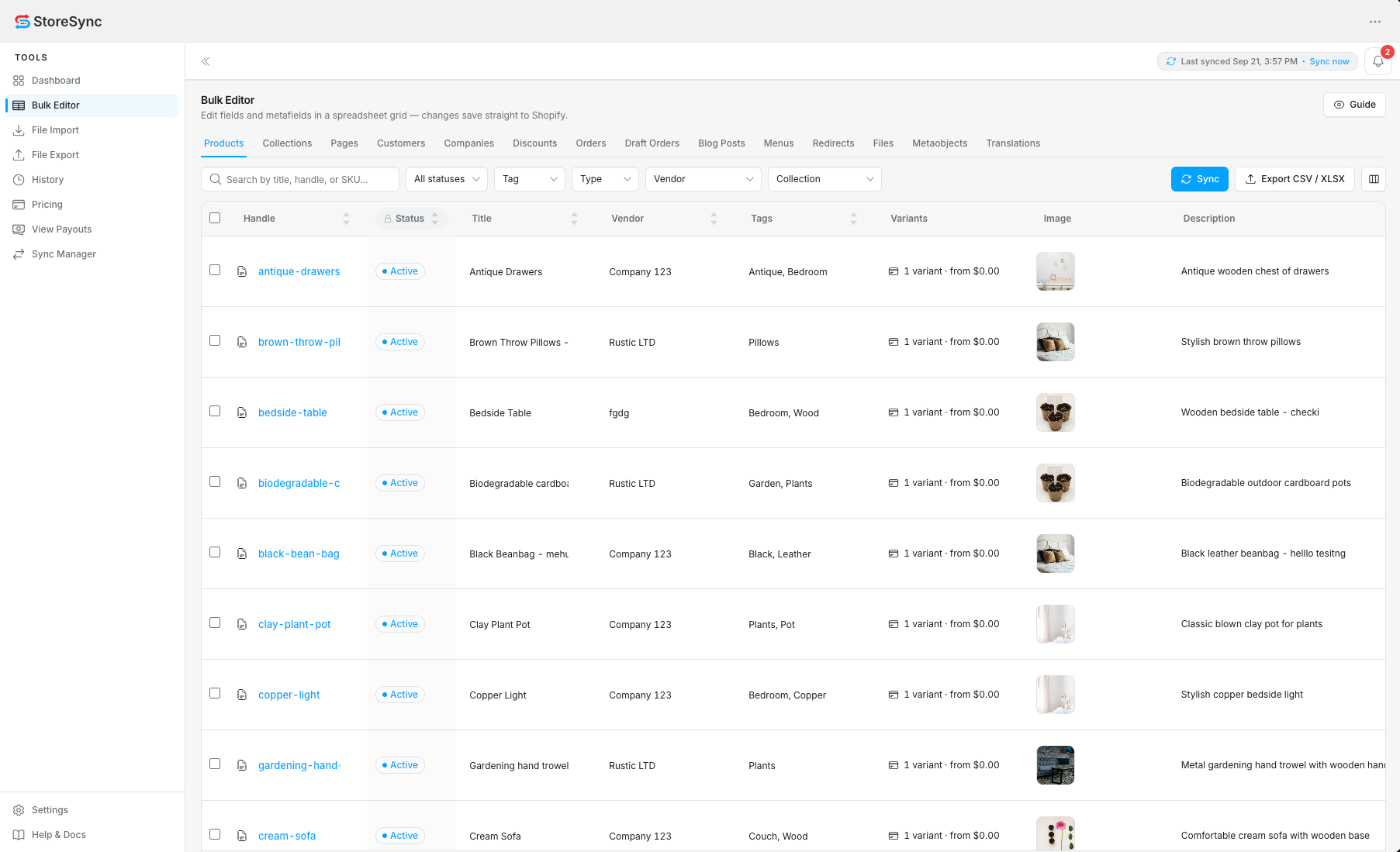
Edit products, collections and pages — plus every metafield — inline in a fast, spreadsheet-style grid.

File Import

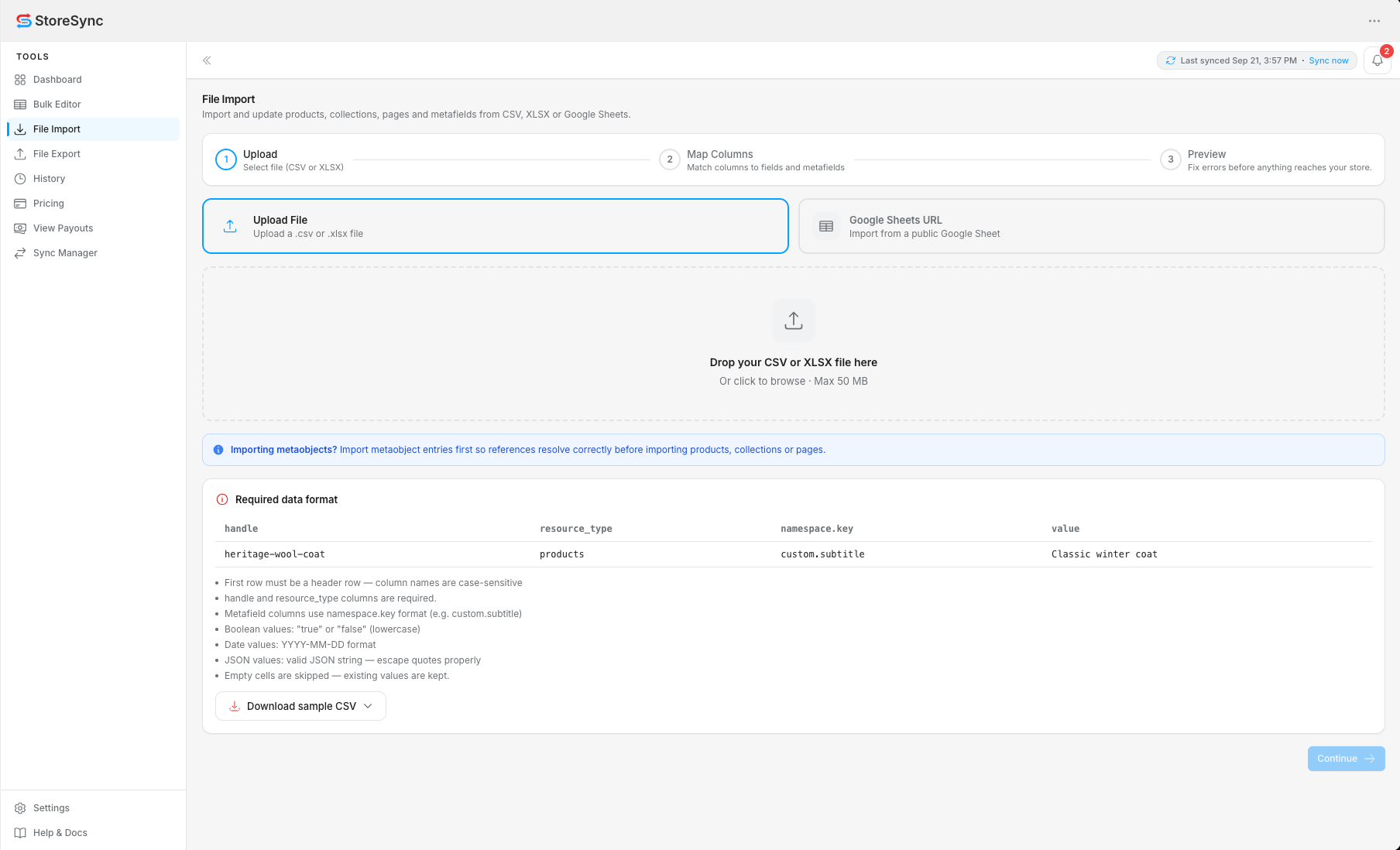
Upload a CSV or XLSX, or paste a public Google Sheet URL. Map columns to fields and metafields, then import.

History

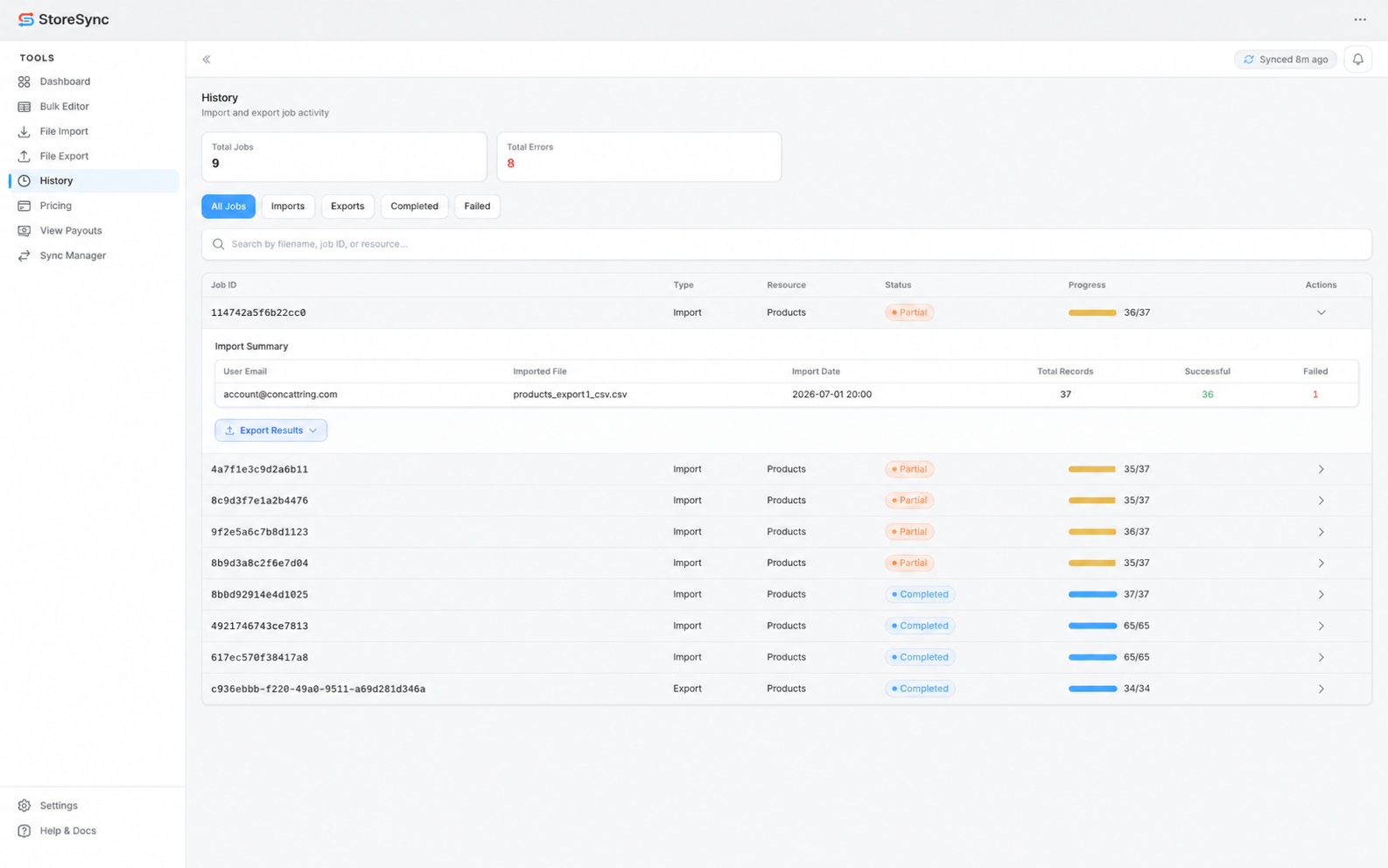
Every import and export logged with record-level progress, totals, and one-click export of failed or successful rows.

Sync & Export

Pull the latest store data on demand and export any resource to a spreadsheet — saved straight to your Shopify Files.

Bulk Editor

A spreadsheet for your whole catalog

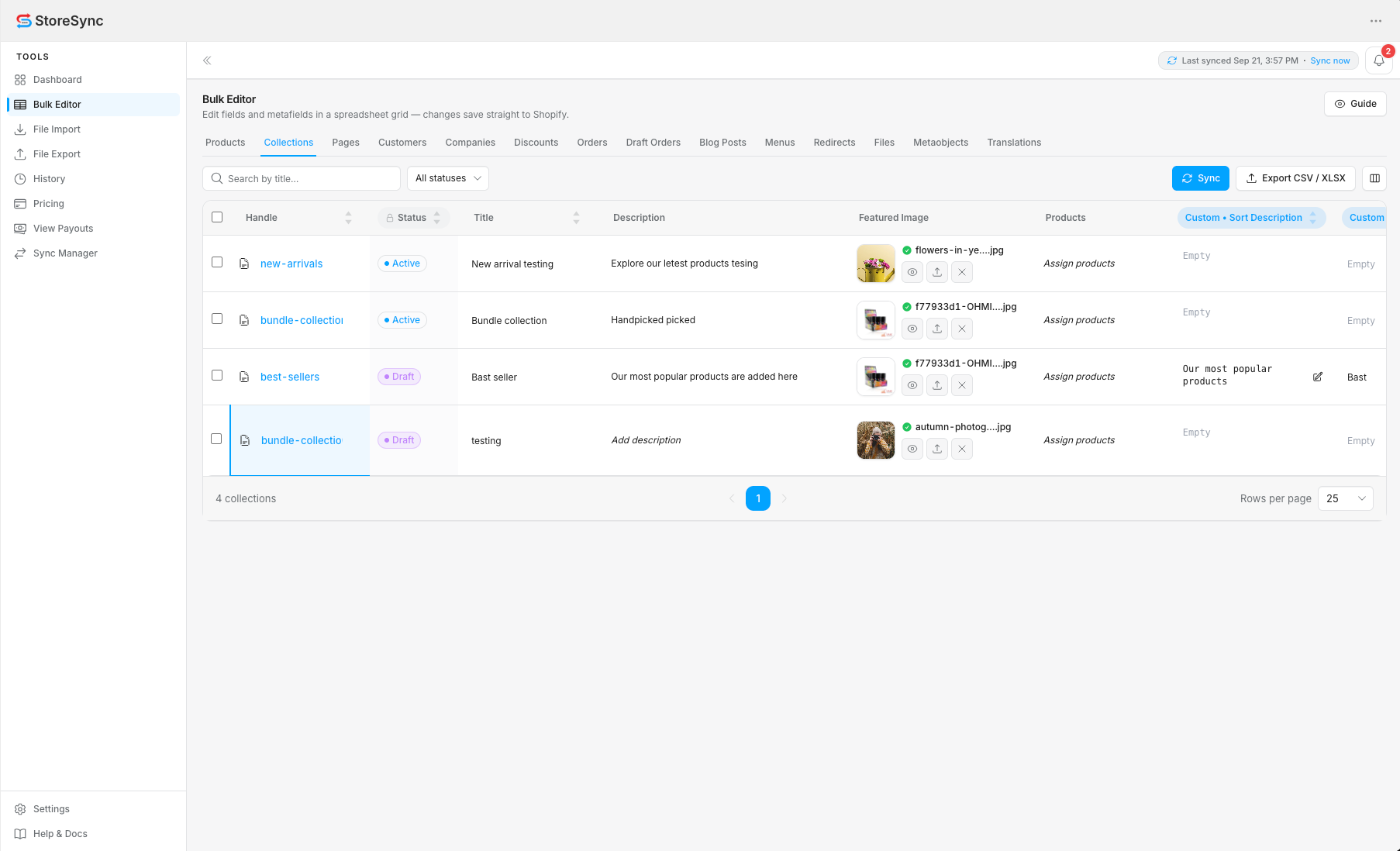
Open Products, Collections or Pages on their own tab and edit titles, vendors, prices, descriptions and custom metafields directly in the grid. Changes save back to Shopify.

  • Inline editing across products, collections & pages
  • Search, filter and choose visible columns
  • Metafields & metaobjects as editable columns
storesync / bulk-editor
Bulk Editor showing the Collections tab
File Import

Import from a file or a Google Sheet

Drag in a CSV or XLSX up to 50 MB, or paste a public Google Sheets link. StoreSync resolves handles, maps your columns to fields and metafields, and validates every row before it writes.

  • Upload · Map columns · Preview & validate
  • namespace.key metafield columns
  • Empty cells are skipped — never overwritten
storesync / file-import
File Import upload step with drag-and-drop drop zone
History

See exactly what every job did

Track imports and exports with live progress like 36 / 37, per-job status, and full summaries. Export all rows, just the failures, or only the successes for quick fixes and clean re-runs.

  • Record-level progress and error counts
  • Filter by imports, exports, completed or failed
  • Export failed or successful rows separately
storesync / history
History view showing import and export jobs with progress
New in Version 2.2

Multi-Store Sync for every store you run

Connect your Shopify stores, choose a primary store, and keep products, collections, customers and more in sync — all from the Sync Manager. Included in the Basic and Pro plans.

Connect Multiple Stores

Link stores with a StoreSync App Key and manage store relationships — open connected stores or disconnect them from one primary store.

Resource Sync

Copy 14 resource types — products, collections, customers, orders, menus and more — from your primary store to every connected store.

Real-Time Sync

Product, collection and customer changes are picked up through Shopify webhooks and synced to connected stores automatically.

Centralized Sync Manager

Connected stores, sync jobs with live progress, configuration and real-time sync history — in one place.

How it works

From install to first bulk edit in minutes

01

Install & sync

Add StoreSync from the Shopify App Store, grant access, and let the first sync pull your catalog into the grid.

02

Edit or import at scale

Change cells directly, or upload a CSV / Google Sheet. Map columns, preview, and StoreSync writes only what you filled in.

03

Track & export

Watch progress in History, fix any failed rows, and export backups straight to your own Shopify Files.

Pricing

Simple plans. Cancel anytime.

Start free, then upgrade for unlimited products, collections, pages, metafields, metaobjects and import / export jobs.

Free

Free forever for small catalogs. Import via CSV and XLSX.

$0/ month
  • Up to 50 product & file imports
  • Up to 20 collections, pages, metaobjects, blog posts, orders, menus, URL redirects, discounts, companies, customers and draft orders
  • Unlimited metafield imports
  • CSV & XLSX imports
Start Free
Basic

Unlimited imports and exports, automatic field mapping and multi-store sync.

$19/ month
  • Unlimited product & file imports/exports
  • Unlimited collection & metaobject imports/exports
  • Unlimited page imports/exports
  • Unlimited metafield imports/exports
  • CSV & XLSX imports & exports
  • Automatic field mapping
  • Multi-store sync manager
Get Basic — $19/mo
Most Popular
Pro

All Basic features plus power-user tools for large catalogs.

$49/ month
  • Includes all Basic features
  • Bulk editor (spreadsheet style)
  • Google Sheets import via URL
Get Pro — $49/mo

Subscriptions are billed monthly through Shopify. All charges are processed securely by Shopify, and you can cancel anytime from the Pricing page inside the app.

Loved by merchants

Built for people who edit a lot of products

Updating 800 product metafields used to take a full afternoon. Now I map a sheet, preview, and it's done before my coffee's cold.

Rosa Medina

The History view is the part I didn't know I needed. When one row fails I export just the failures, fix them, and re-import. No guessing.

Deepak K.

Google Sheets import is exactly how our team already works. We keep the sheet, StoreSync keeps Shopify in sync. Simple.

Amy Lin
FAQ

Questions, answered

What does StoreSync do?
StoreSync is a bulk metafield manager for Shopify. Edit products, collections and pages in a spreadsheet-style grid, import and export metafields via CSV, XLSX or Google Sheets, and track every job in History.
Which resources can I manage?
Products, collections and pages — including their metafields and metaobjects. Each lives on its own tab in the Bulk Editor.
What file formats can I import?
CSV and XLSX uploads up to 50 MB, plus public Google Sheets via URL. The first row must be a header row and column names are case-sensitive.
Will importing overwrite my data?
Only the cells you fill in are written. Empty cells are skipped, so a partial sheet updates just the metafields you intend to change. Export a backup first if you're unsure.
Where are my exported files stored?
History report exports are saved as CSV files directly into your own Shopify store's Files. They live on Shopify's infrastructure under your store account — not on StoreSync servers — and you can delete them any time.
How much does StoreSync cost?
There's a Free plan with up to 50 product & file imports, up to 20 of each other resource and unlimited metafield imports via CSV & XLSX, so you can try StoreSync at no cost. Basic is $19/month with unlimited imports and exports, automatic field mapping and the multi-store sync manager. Pro is $49/month and adds the spreadsheet-style Bulk Editor and Google Sheets import via URL. Billing runs through Shopify and you can cancel anytime.

Ready to manage Shopify metafields faster?

Install StoreSync from the Shopify App Store and run your first bulk edit in minutes.